Searching On Google
Searching on Google search engine is simple: just type whatever comes to mind in the search box, hit Enter or click on the Google Search button, and Google will search the web for pages that are relevant to your query. Every word matters. Generally, all the words you put in the query will be used. There are some exceptions.
- Search is always case insensitive.
- Generally, all the words you put in the query will be used.
- Punctuation is ignored.
Some Basics
Most of the time you’ll find exactly what you were looking for with just a basic query. However the following tips can help you refine your technique to make the most of your searches.
- Keep it simple. If you’re looking for a particular company, just enter its name, or as much of its name as you can recall. Most queries do not require advanced operators or unusual syntax. Simple is good.
- Think how the page you are looking for will be written. A search engine is not a human; it is a program that matches the words you give to pages on the web. Use the words that are most likely to appear on the page. For example, instead of saying [my head hurts], say [headache], because that’s the term a medical page will use. The query [in what country are bats considered an omen of good luck?] is very clear to a person, but the document that gives the answer may not have those words. Instead, use the query [bats are considered good luck in] or even just [bats good luck].
- Describe what you need with as few terms as possible. Since all words are used, each additional word limits the results. If you limit too much, you will miss a lot of useful information. The main advantage to starting with fewer keywords is that, if you don’t get what you need, the results will likely give you a good indication of what additional words are needed to refine your results on the next search. For example, [weather Gujrat] is a simple way to find the weather and it is likely to give better results than the longer [weather report for Gujrat Pakistan].
- Choose descriptive words. The more unique the word is the more likely you are to get relevant results. Words that are not very descriptive, like ‘document,’ ‘website,’ ‘company,’ or ‘info,’ are usually not needed. Keep in mind, however, that even if the word has the correct meaning but it is not the one most people use, it may not match the pages you need. For example, [ celebrity ringtones ] is more descriptive and specific than [ celebrity sounds ].
Reading Search Results
Google’s goal is to provide you with results that are clear and easy to read. The diagram below points out four features that are important to understanding the search results page:
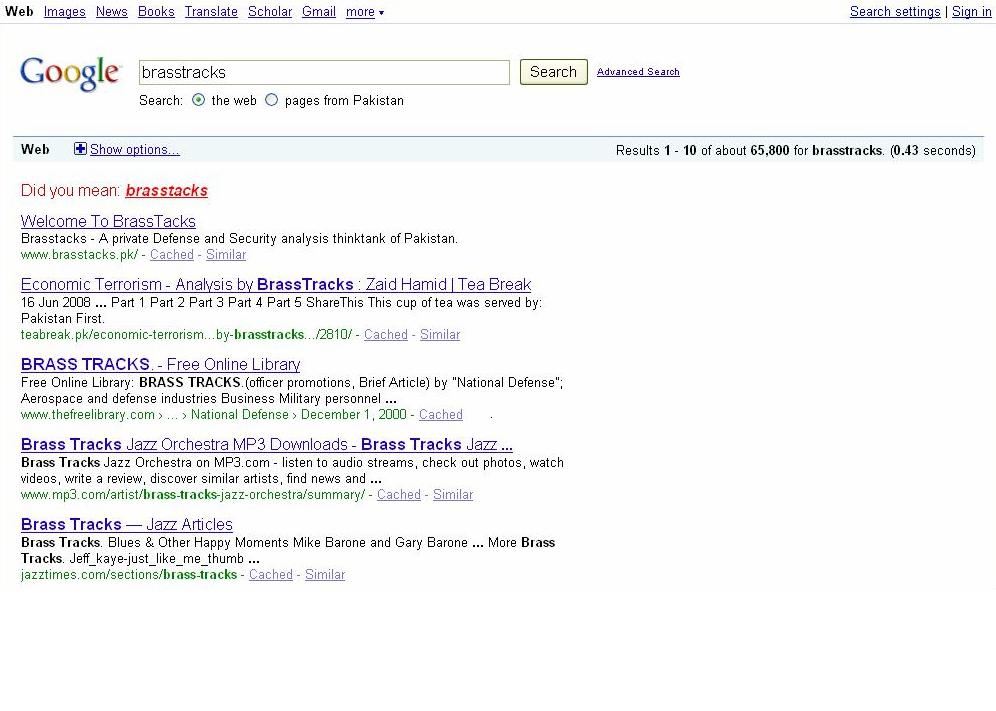
1. The title: The first line of any search result is the title of the webpage.
2. The snippet: A description of or an excerpt from the webpage.
3. The URL: The webpage’s address.
4. Cached link: A link to an earlier version of this page. Click here if the page you wanted isn’t available.
Search Operators
operator |
information |
+ |
This operator will help to add text in the search key words for example if you want to find music and also want Google to look for the word atif aslam. This operator will add the search word atif aslam in the key word. You should type like this music+ atif aslam. |
– |
This operator will help to remove extra attached query in the search key words for example if you want to find atif aslam music but did not want music. This operator will remove word music from the search word atif aslam music. Google will look for atif aslam only. You should type like this atif aslam-music. |
OR |
This operator will help to add optional search for Google in the search key words for example if you want to find music and also want Google to look for the word atif aslam. This operator will in the search will bring those results that contain both atif aslam and music but also search individual key search from single website like atif alsm in one website and music on other. You should type like this atif aslam or music. |
operator |
information |
” “ |
This operator will help and forced Google to search for particular search key words for example if you want to find pakistan soft drink market. This operator will force Google to look for Pakistan soft drink market on all the websites. You should type like this “Pakistan soft drink market”. |
~ |
This operator will help to look for similar words, or synonyms. If you want to search health tips this operator will returns results with heath help, guide, tutorial etc. You should type like this ~tips. |
* |
* Operator is called a wildcard. This operator will help for something was half in your mind. This will force to Google to join the part with the part that was not in your mind. For example if you want to find song tera bina zindagee say shikwa naheen. This operator will force Google to look for remaining part of lyrics tera bina zindagee say shikwa naheen on all the websites. You should type like this *tera bina zindagee say shikwa naheen. |
. .. |
This operator will Search for product ranging between the amounts you desire. For example if you want to search for computer ranging between Rs 500 to 1000. This operator will search for the sites that have information and contain computer between Rs 500 to 1000. You should type like that computer Rs. 500. . . 1000 . |

 Servceli | Strategy. Identity. Growth.
Ilana
November 10, 2014 at 4:02 pm
Hi to all, how is all, I think every one is getting more
from this website, and your views are pleasant for new viewers.
LikeLike